How to Investigate Online Impersonation With OSINT
A suspicious profile uses the right name, the right logo, and a biography copied from the real account. Its messages sound convincing. The email domain is one character off, the phone number is unfamiliar, and the wallet in the payment request has never appeared in the organization’s public material.
That is enough to suspect impersonation. It is not yet enough to document it.
An online impersonation investigation compares the suspicious identifiers with a known-good reference, looks for evidence of copying or misrepresentation, and separates observable facts from conclusions. The result should tell a reviewer what was copied, what does not match, how the suspicious account connects to other activity, and how confident the attribution is.
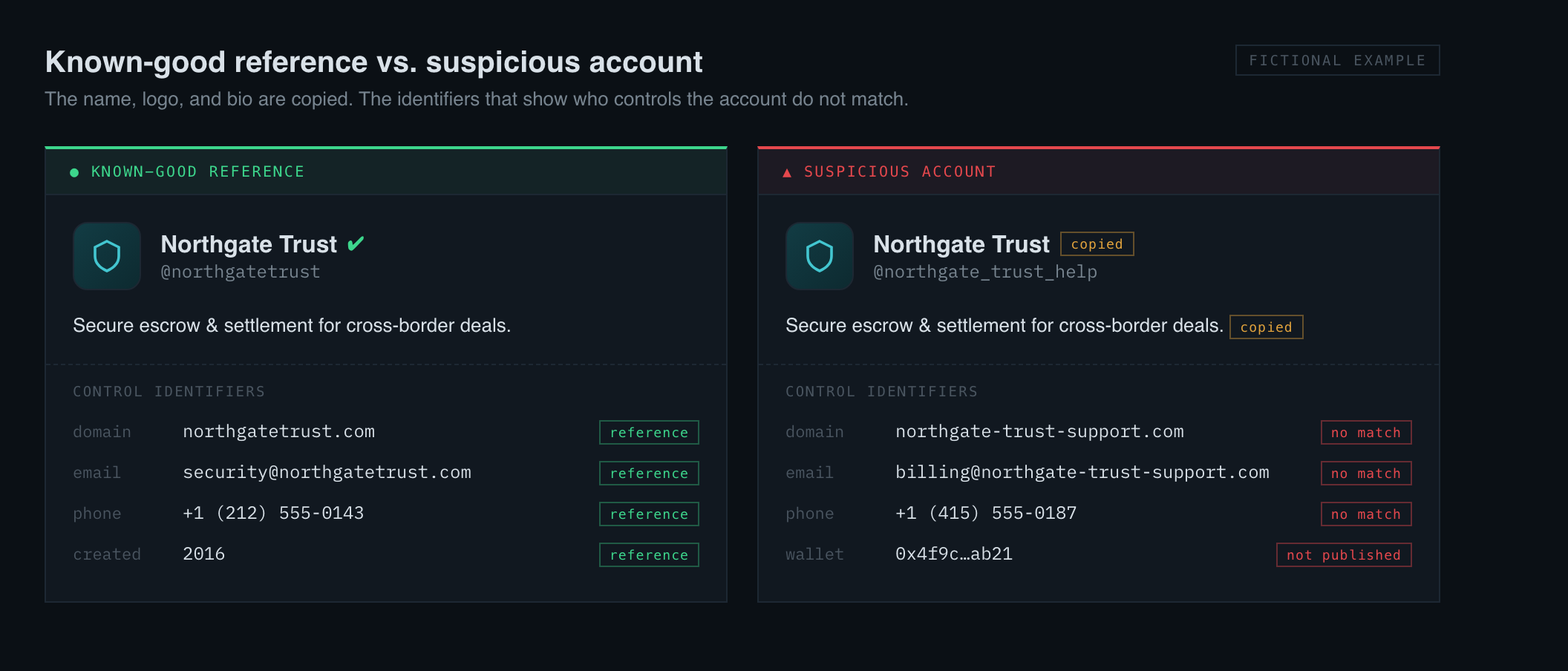 The copied name, logo, and bio establish resemblance. The control identifiers — username, domain, phone, wallet — are what decide whether it is the same entity. (Fictional example.)
This guide walks through that process using OSINT, then shows how DefenceCore organizes the same evidence.
What online impersonation looks like
Impersonation is broader than a fake social-media profile. It can involve:
- a display name and profile photo copied from a real person;
- a lookalike domain used for phishing or fake invoices;
- an email address designed to resemble an executive or supplier;
- a phone number presenting itself as a known organization;
- a cloned marketplace or customer-support account;
- a wallet address substituted into a legitimate payment conversation;
- an account that mixes genuine public details with false contact information.
The copied material establishes resemblance. The investigation still needs to show that the suspicious identifiers are not controlled by the referenced person or organization—or that public evidence supports misrepresentation.
Step 1: Preserve the suspicious material
Before searching, preserve what triggered the case:
- full profile URL;
- username and display name;
- email address and complete domain;
- phone number in international format;
- wallet address and network;
- message text and timestamps;
- visible profile images, logos, and biography;
- where and how the contact was presented as genuine.
Keep the original files or platform exports where policy permits, and record the collection time. Online content changes quickly. A username can be renamed, a profile image removed, and a domain redirected after a report is filed.
The goal is not to create an enormous archive. Preserve the evidence needed to reproduce the comparison and support the legitimate fraud or security response.
Step 2: Define a known-good reference
Impersonation is a comparison problem. You need an authoritative or well-supported reference profile.
For a company, that may be the official website, published contact page, verified social account, known email domain, or documented payment details. For an employee or vendor in an internal case, use contact information already held in an approved business system or confirmed through an established channel.
Write down which source makes the reference trustworthy. A popular profile is not automatically the original. A search result can rank an impostor above the genuine account. The reference should have a clear chain back to the person or organization being represented.
Step 3: Compare stable and copied attributes separately
Create two lists.
Copied or matching attributes:
- display name;
- biography or job title;
- logo or profile image;
- public posts or product descriptions;
- organization name;
- visual branding.
Control or infrastructure attributes:
- username;
- email and domain;
- phone number;
- linked website;
- account creation date;
- payment or wallet address;
- recovery or contact paths visible in public sources.
Copied attributes show how the account creates credibility. Control attributes are more useful for deciding whether the suspicious account belongs to the reference entity.
A perfect logo match can strengthen an impersonation finding while providing almost no evidence that the accounts share an owner. In fact, the ease of copying is why visual similarity needs infrastructure comparison.
Step 4: Inspect the suspicious identifiers
Investigate every identifier the suspicious account controls.
For an email or domain, inspect registration timing, mail infrastructure, exact-match public mentions, and whether the domain is a lookalike of the genuine one. For a phone, check country, carrier, line type, recent port or SIM-swap signals where available, linked accounts, and spam history. For a username, search for reuse and older profiles. For a wallet, review published ownership claims and relevant on-chain relationships.
The email investigation walkthrough explains email-led pivots. If the suspicious contact used a phone, the phone ownership guide explains why subscriber, user, and displayed caller identity must be kept separate.
Do not contact the suspicious account, trigger recovery flows, or attempt to access it. Public-source investigation should not alter the account or alert its operator.
Step 5: Look for positive evidence of impersonation
A mismatch alone may show that an account is unaffiliated. Stronger impersonation evidence shows deliberate representation.
Examples include:
- the suspicious account explicitly claims to be the person or company;
- copied biography text contains distinctive wording from the genuine profile;
- images or posts were copied from known-good sources;
- a lookalike domain reproduces the organization’s branding and contact flow;
- the account directs users to send money or credentials while presenting itself as the reference entity;
- several suspicious accounts reuse the same phone, email, domain, or wallet while copying the same target.
Document the exact claim and the exact copied element. Avoid broad statements such as “obviously fake.” A reviewer or platform-abuse team needs reproducible evidence.
Step 6: Check for an innocent explanation
Not every unofficial account is an impersonator.
Consider:
- an authorized regional or employee-managed account;
- a fan, commentary, or parody account that is clearly labeled;
- an old domain or phone number that the organization previously used;
- a reseller or contractor with permission to use branding;
- a platform migration;
- a compromised genuine account.
Where possible, compare against internal authorization records or confirm through a known-good channel. If authorization cannot be checked, state that limitation.
Compromise deserves special attention. A genuine account sending fraudulent messages is not a copied identity; it may be an account takeover. The containment path and the evidence needed are different.
Step 7: Map linked impersonation infrastructure
Once the suspicious account is documented, investigate whether its control identifiers connect to other accounts.
A phone number may appear on several fake support profiles. A lookalike domain may share registration or hosting patterns with related domains. A wallet may appear in several payment requests. A username variant may be reused across platforms.
Use cautious entity resolution. The goal is to find defensibly linked emails, phones, names, and usernames, not to attach every similar account to one operator.
This step can turn a one-account takedown into a broader abuse response while keeping uncertain links clearly labeled.
Step 8: Write the finding for action
A useful impersonation finding answers:
- What known-good identity was represented?
- Which account or identifiers made the representation?
- What material was copied or what claim was made?
- Which control attributes contradict the genuine reference?
- Are the suspicious identifiers linked to other activity?
- What is the confidence level?
- What evidence or authorization check remains unavailable?
An example conclusion might be:
High confidence that the reviewed profile is unaffiliated and impersonates the referenced company. The profile reproduces distinctive official biography text and branding, directs users to a lookalike domain registered recently, and uses a phone number not present in approved company records. The phone and domain are also linked by independent public sources. Operator identity was not established.
Notice the boundary: the finding documents impersonation without claiming to know who operated the account.
Run the impersonation investigation in DefenceCore
DefenceCore frames the goal as:
Is there public evidence that these identifiers are being copied or misrepresented?
Add the suspicious identifiers and, where available, the known-good reference identifiers. DefenceCore investigates the signals, compares their public footprint, follows relevant pivots, and returns a sourced report.
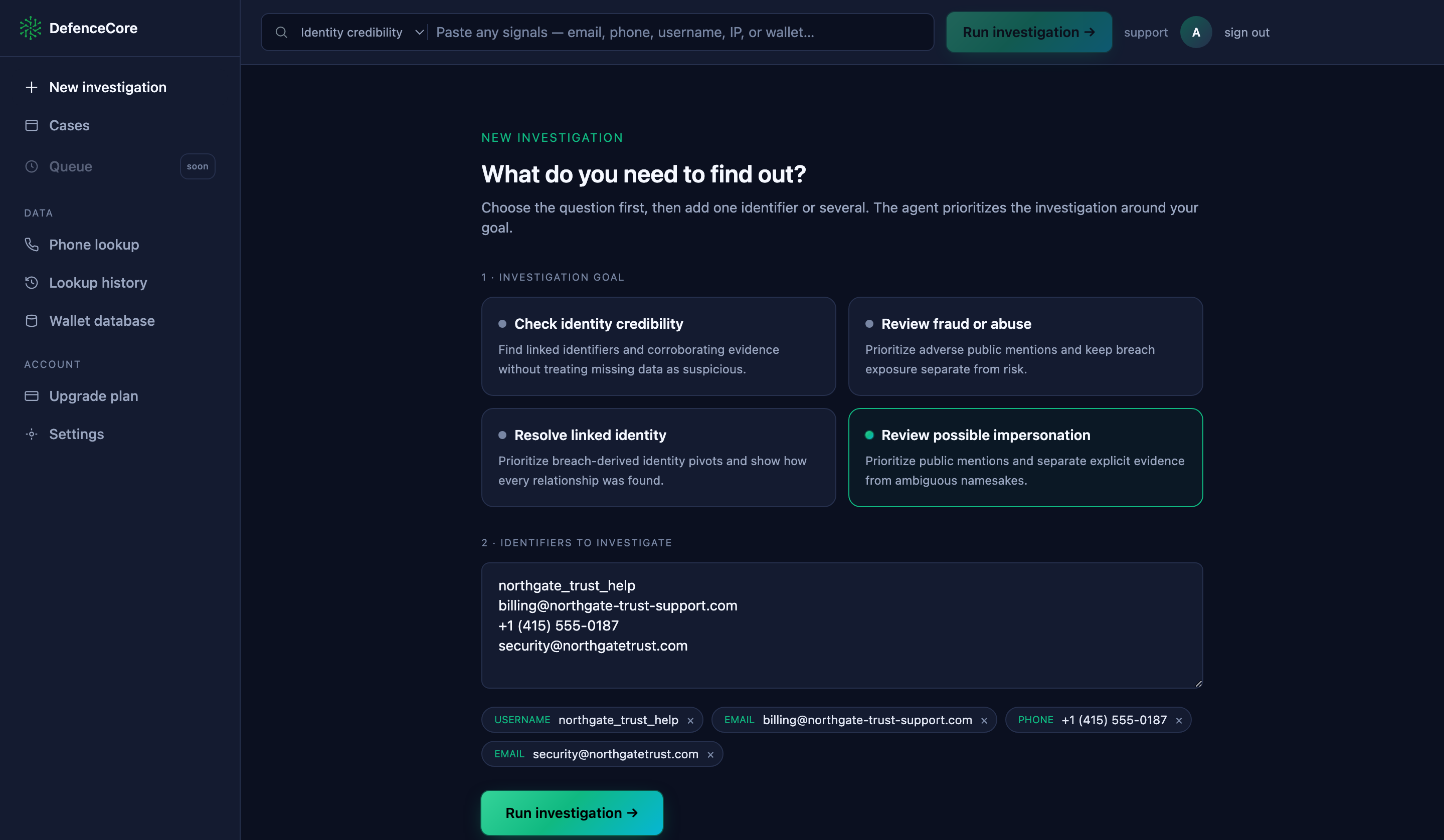 The suspicious handle, email, and phone entered next to a known-good address from the real domain — so the agent can compare the two footprints rather than investigate one in isolation.
The report can show:
- which attributes match the reference;
- which emails, phones, usernames, domains, or wallets are linked to the suspicious identity;
- confidence scores for those relationships;
- defined risk signals supported by the evidence;
- coverage limits and the next action the case supports.
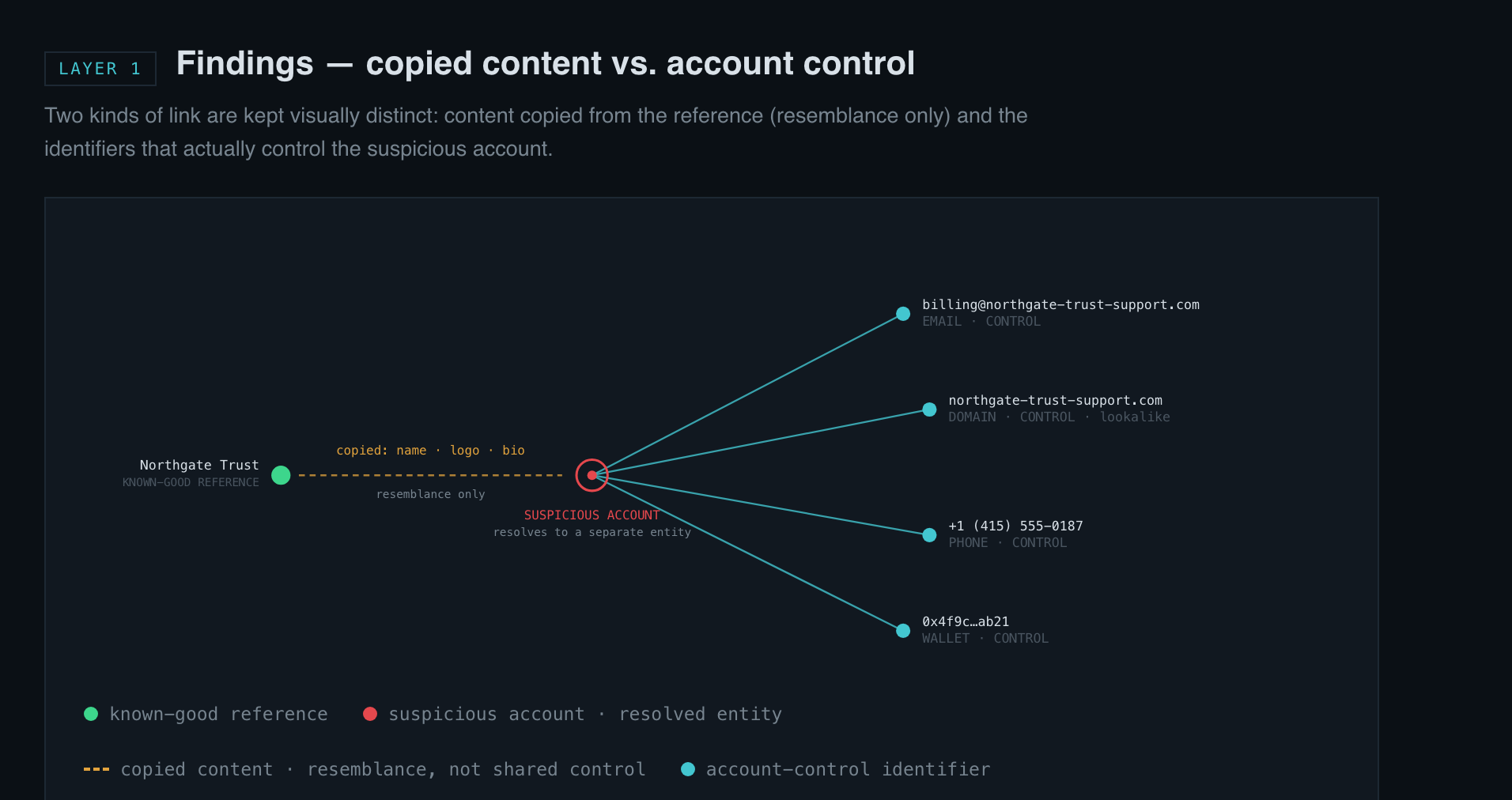 Copied content (name, logo, bio) links the suspicious account to the reference by resemblance; its control identifiers — email, phone, domain, wallet — resolve to a separate entity. The graph keeps those two kinds of link visually distinct.
The distinction between matching content and matching control is preserved in the evidence. A copied image is a finding. A link between the suspicious email and the genuine organization requires its own support.
How to use the report
For an internal security case, attach the sourced findings to the incident record and follow the organization’s containment and notification process. For a platform report, include the exact profile, the known-good reference, the copied claims, and the control-attribute mismatches the platform can verify.
If payment was requested, preserve the wallet or beneficiary details and escalate through the appropriate fraud workflow. If a genuine account may be compromised, switch from impersonation response to account-takeover containment.
The report is evidence for a decision, not a substitute for the receiving platform’s policy or legal process.
Try it on a documented impersonation case
Choose a legitimate case with a suspicious account and a reliable reference. Add both sides of the comparison: the suspicious email, phone, username, domain, or wallet, plus the known-good identifiers you are authorized to use.
DefenceCore will return the supported connections, mismatches, copied-identity evidence, and coverage limitations in one case file. See a sample report or run an investigation.
For verified organizations. Fraud prevention and security investigations only. DefenceCore is not a people-search tool and does not support locating individuals.